

Optimized – RAM Manager: Reduce Chrome Memory Usage Instantly
raydevs
Cara Install Ekstensi Chrome
- Klik tombol "Chrome এ যোগ করুন" di atas.
- Anda akan diarahkan ke Chrome Web Store.
- Klik "Add to Chrome" pada halaman ekstensi.
- Konfirmasi dengan klik "Add Extension" pada popup.
- Ekstensi akan otomatis terpasang dan ikon muncul di toolbar.
- Klik ikon ekstensi di toolbar untuk mulai menggunakan.
Screenshot
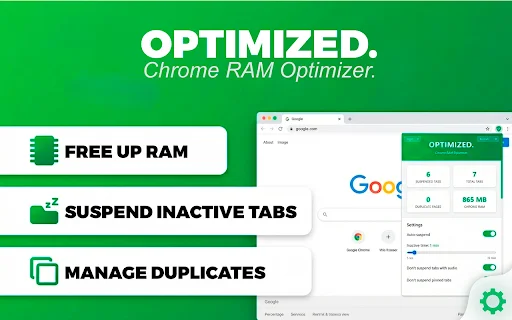
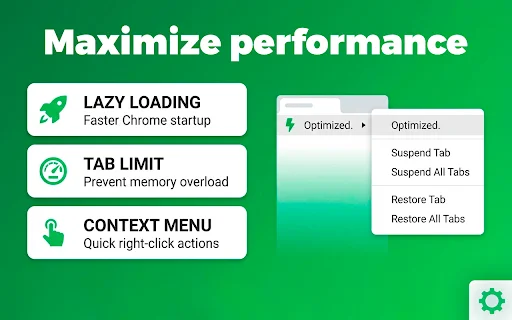

Does your browser slow down when you have dozens of tabs open? For power users, researchers, and professionals juggling multiple projects, browser performance is critical. Optimized – RAM Manager is the ultimate Chrome extension designed to reclaim your computer’s memory, ensuring that your browser remains fast and responsive, no matter how many tabs you have active.
Stop dealing with system freezes and sluggish performance. By automatically suspending inactive tabs and managing memory usage, Optimized allows you to focus on your work without the constant fear of your browser crashing. Experience a leaner, faster browsing session today with our intelligent, privacy-focused tab management solution.
Key Features
- Automatic Tab Suspension: Hibernates background tabs while keeping their state preserved.
- RAM Monitoring: Proactively activates when memory usage crosses the 80% threshold.
- Duplicate Tab Detection: Automatically identifies and closes redundant pages.
- Smart Exclusions: Whitelist specific sites or protect pinned/audio tabs from suspension.
- Lazy Loading: Accelerate your browser startup speed by loading only the active tab.
- Custom Themes: Switch between Light, Dark, and OLED-friendly Black modes.
- Multi-Language Support: Available in 8 languages for a global user experience.
- Privacy-First: Zero data collection; all settings remain local on your device.
How to Use
- Install the extension from the Chrome Web Store and click the icon to open settings.
- Set your preferred inactivity timer to determine when tabs should be suspended.
- Browse the web normally; the extension will handle background memory optimization automatically.
- Click any suspended tab to restore it instantly when you need to revisit it.
FAQ
Does this extension collect my browsing data?
No, Optimized collects zero user data. Everything stays on your local device with no tracking or analytics.
Will I lose my work in suspended tabs?
No, the extension uses Chrome’s native tab discarding API to preserve the state of your tabs so you can resume exactly where you left off.
Can I prevent specific websites from being suspended?
Yes, you can use the Smart Exclusions feature to whitelist specific sites or protect tabs currently playing audio.
Does it work with pinned tabs?
Yes, the extension is designed to automatically respect and exclude pinned tabs from being suspended.
Which browsers are compatible?
Optimized is compatible with Chrome and Edge version 88 or higher across Windows, macOS, Linux, and ChromeOS.
Ready to supercharge your browser performance? Take control of your RAM and eliminate slowdowns for good. Download Optimized – RAM Manager today and enjoy a faster, more efficient browsing experience!
Users highly praise the extension for its superior memory management compared to Chrome's built-in features, noting it is perfect for heavy multi-taskers.
Kelebihan
- More memory efficient than built-in Chrome management
- Well-organized and effective for heavy users
- Helps keep the browser fluid even with 30+ tabs
Kekurangan
- Needs an option to exclude localhost URLs
Ulasan Pengguna
Works great. Please add a capability to exclude localhost urls too.
Easy to use, saves more memory than the built-in performance management.
Perfect, it fulfills what it promises, is well organized, and helps those of us who have a habit of keeping 30 tabs open to organize them, leaving more memory free and making the browser more fluid.
| ID Ekstensi | mahgcggahcbplkpmpmhdnbdjbcnoafcg |
|---|---|
| ভার্সন | 1.0.5 |
| সাইজ | 0.1 MB |
| Developer | raydevs |
| Terakhir Diperbarui | |
| Tanggal Rilis | |
| Jumlah Pengguna | 2.000++ |
| Jumlah Ulasan | 4 |
| Chrome Store Ranking | #19134 |
| ক্যাটাগরি | Productivity |
| Tipe | বিনামূল্যে |

Podly ডাউনলোড করুন – Merch by Amazon-এর জন্য সেরা AI লিস্টিং টুল
Podly

ManufApp ডাউনলোড করুন – এআই চালিত প্রোডাকশন ম্যানেজমেন্ট টুল
Wyntok Technologies

Substack Downloader ডাউনলোড করুন – ভিডিও ও অডিও সেভ করুন
https://neocortexai.in

Mac-এ Split Screen ডাউনলোড করুন – আপনার প্রোডাক্টিভিটি বাড়ান
venevtsev.vladislav

Address Finder for Rightmove ডাউনলোড করুন – সঠিক ঠিকানা ও পোস্টকোড
[email protected]

GX Technician অ্যাপ ডাউনলোড করুন – GlobalXtreme টেকনিক্যাল সলিউশন
GlobalXtreme Software